 Balakumar L
Introduction
Ever stared at your YouTube Studio wondering how much you’re actually earning? The truth is, most creators have no idea what their channel’s worth. A YouTube money calculator changes that in seconds. Whether you’re chasing full-time income or building a side hustle, knowing your real earning potential isn’t optional—it’s essential. Let’s walk through how this simple tool can transform your entire content strategy.
Table of Contents
- Quick Facts About YouTube Earnings
- Instant Earnings Estimation Without Guessing
- Compare CPM Rates Across Different Niches
- Plan Your Content Strategy Based on Real Numbers
- Negotiate Better Brand Deals and Sponsorships
- Understand Your Audience’s Geographic Value
- Track ROI on Your Time Investment
- Set Realistic Income Goals for Your Channel
- Identify Which Videos Generate the Most Revenue
- Optimize Your Upload Schedule Based on Earnings Data
- Diversify Revenue Streams Beyond AdSense
- Important Statistics Table
- YouTube Money Calculator Comparison Table
- 2026 YouTube Earnings Trends
- FAQ Section
- References
Key Highlights – Quick Facts
- The average CPM across all niches increased to $6.15 in 2026, up 27.6% from $4.82 in 2025
- Mid-tier channels (100K-500K subscribers) experienced the fastest revenue growth at 31% year-over-year
- Gaming content commands $9.20 CPM while lifestyle averages $3.60
- US audiences generate 5-10x more revenue than viewers from developing countries
- Shorts revenue now accounts for 18% of total creator earnings, but YouTube still pays much less per view
- YouTube takes 45% of ad revenue; your actual RPM is approximately 55% of your CPM
- The global creator economy exceeds $250 billion in 2026
- Only 4.3% of YouTube’s 115+ million channels are enrolled in the Partner Program
1. Instant Earnings Estimation Without Guessing
Why Manual Calculations Waste Your Time
Most creators try to calculate earnings the hard way: diving into YouTube Studio, scrolling through revenue tabs, comparing numbers across multiple spreadsheets. It takes forever. A YouTube money calculator like HugeCount’s tool eliminates this by letting you estimate earnings instantly based on views and CPM.
You simply input your daily view count and expected CPM, and boom—you get daily, monthly, and yearly estimates in seconds. No spreadsheets. No confusion about YouTube’s cut. No wondering if your mental math was right.
Real-World Example
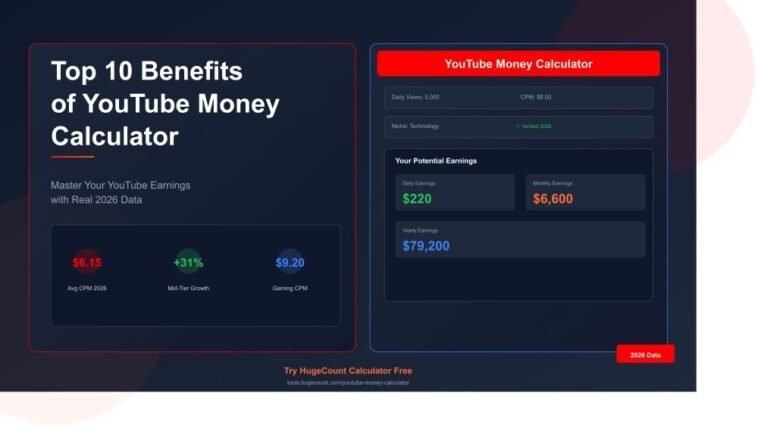
Imagine you’re running a tech channel with 5,000 daily views. Without a calculator, you’re guessing. With one, you know: at $8 CPM (typical for tech), you’re earning roughly $220 per day. That’s $6,600 per month. That changes your decision-making immediately.
2. Compare CPM Rates Across Different Niches
The Niche Game-Changer
Gaming content commands $9.20 CPM, technology averages $8.40, business/finance hits $7.80, but lifestyle sits at just $3.60. That’s a massive difference—and most creators have no idea where their niche ranks.
A good YouTube money calculator lets you toggle between niches and see exactly what you’d earn if you switched content types. Want to know how much a cooking channel earns versus a finance channel? Input the same view count and compare.
Why This Matters for New Creators
The CPM spread ranges from $1.50 for music content to $65+ for finance—a 40x difference. If you’re just starting, knowing this before you invest 6 months into the wrong niche could save you thousands in wasted effort.
3. Plan Your Content Strategy Based on Real Numbers
Data-Driven Decision Making
Most creators plan based on gut feeling: “Cooking videos get lots of views, so I’ll do that.” Wrong approach. Finance content pays $20-50 CPM, gaming pays $1-4 CPM. Your strategy should account for this.
Using a calculator, you can say: “If I target finance content at $40 CPM with 2,000 daily views, I earn $2,800 monthly. If I do gaming at $3 CPM, I need 933,000 daily views to match that.” Suddenly your decision becomes obvious.
The Balance Question
The calculator also helps you find the sweet spot: Finance/business niches earn 5-10x more per view but have higher competition and smaller audiences, while gaming/entertainment have lower RPM but massive audience potential.
4. Negotiate Better Brand Deals and Sponsorships
Your Earnings Data is Negotiation Power
When a brand reaches out asking, “What’s your rate?” do you have a number? Most small creators just ask for whatever sounds reasonable. That’s negotiating in the dark.
A YouTube money calculator gives you hard numbers. If your channel earns $4,000 monthly from AdSense, you know what minimum sponsorship rate makes sense. Many sponsorships offer 10-50% of your monthly ad revenue—but you can’t negotiate smartly without knowing that number.
Real Sponsorship Pricing
Let’s say your calculator shows $5,000 monthly earnings at your current view rate. A sponsor offering $2,000 for a mention is actually buying about 40% of your monthly income. You now know whether that’s fair or not.
5. Understand Your Audience’s Geographic Value
Why Your Audience Location Matters More Than You Think
A channel with 90% US audience can earn 10x more than an identical channel with the same view count from developing countries. This is the geographic arbitrage game that most creators completely miss.
US viewers generate $4-12 CPM, UK $3-8, Germany $2-6, and India $0.5-2. The calculator should let you see this instantly.
Strategic Audience Building
If you’re brand new, this data is crucial. Should you focus on US audiences? UK audiences? Or optimize for volume from developing countries? The calculator makes it obvious: target high-value geography when starting out, then diversify once you have audience momentum.
6. Track ROI on Your Time Investment
The Hours-to-Income Reality Check
Here’s the uncomfortable question: is creating YouTube content worth your time?
To consistently earn $1,000 per month from AdSense based on your selected niche and RPM, your channel needs to generate approximately hundreds of thousands of views per month.
A YouTube money calculator forces you to face this math. If you’re spending 40 hours per week creating videos and earning $200 monthly, that’s $5 per hour. That’s worse than flipping burgers. The calculator makes this obvious and helps you decide: invest more, change niches, or add sponsorships.
The Pivoting Point
Many creators use calculators to realize they need to pivot. Maybe cooking content pays too little. Maybe your geography target is wrong. The tool gives you the data to make that call confidently.
7. Set Realistic Income Goals for Your Channel
Stop Dreaming, Start Planning
“I want to earn $10,000 per month from YouTube.” That’s everyone’s goal. But what does it actually take?
The calculator breaks it down. If your CPM is $10, your actual RPM (what you earn) is approximately $5.50. To earn $10,000 monthly at $5.50 RPM, you need 1.8 million views per month, or 60,000 views daily.
That’s a massive number. Most channels never get there. But now you know what you’re actually aiming for.
Breaking It Into Milestones
A good calculator lets you work backward. Want $5,000 monthly? At your niche’s CPM, what daily view count does that require? The calculator shows you the exact target—and you can break it into quarterly goals.
8. Identify Which Videos Generate the Most Revenue
Not All Views Are Equal
A video with 100,000 views in finance might earn more than a video with 500,000 views in music. CPM reflects the raw value advertisers place on an audience, and some audiences are worth far more.
By calculating earnings per video based on views and niche, you can identify your money-makers. Maybe your tutorials earn 10x more per view than your shorts. That tells you exactly what to double down on.
The Retention Factor
The calculator also reveals which content keeps people watching longer. Longer videos mean mid-roll ads, which means higher earnings. You can calculate this difference and decide: should I make 10-minute videos instead of 5-minute ones?
9. Optimize Your Upload Schedule Based on Earnings Data
Seasonal Earnings Fluctuations
Q4 (Oct-Dec) CPM rates are 20-50% higher due to holiday advertising. This isn’t a small difference—it directly impacts your earnings.
A calculator that factors in seasonality shows you when to upload your biggest videos. You wouldn’t drop your most important video in September when CPM rates are lowest. You’d save it for October-December when advertisers are spending.
Real-Time CPM Tracking
CPM fluctuates constantly based on real-time ad auctions. The best calculators track this and show you the current rates for your niche, not outdated averages.
10. Diversify Revenue Streams Beyond AdSense
The Single Revenue Stream Problem
Creators who earn 40-60% of income from non-AdSense sources are far less vulnerable to seasonal and algorithmic swings that affect CPM rates.
A YouTube money calculator forces you to ask: is AdSense enough? Most likely, no. The calculator shows your AdSense potential, then you can calculate what you’d need from sponsorships, affiliate marketing, or digital products to reach your target income.
Building Your Revenue Mix
Maybe AdSense gives you $2,000 monthly. Your goal is $5,000. The calculator makes it clear: you need $3,000 from other sources. Now you can strategically add sponsorships (one brand deal might cover this), create a course, or build an affiliate program.
Important Statistics Table
| Metric | 2026 Data | Source |
|---|---|---|
| Average CPM (All Niches) | $6.15 | TubeAnalytics 2026 |
| Gaming CPM | $9.20 | TubeAnalytics 2026 |
| Technology CPM | $8.40 | TubeAnalytics 2026 |
| Finance CPM | $25-50 | NoteLM 2026 |
| Music CPM | $1.50 | YTStudio 2026 |
| US CPM Range | $4-12 | FluxNote 2026 |
| UK CPM Range | $3-8 | FluxNote 2026 |
| India CPM Range | $0.5-2 | FluxNote 2026 |
| YouTube’s Revenue Share | 45% (to platform) | Google Official |
| Creator’s Revenue Share | 55% (per split) | AdSense 2026 |
| Mid-Tier Growth (100K-500K) | 31% YoY | TubeAnalytics 2026 |
| Shorts Revenue Share | 18% of earnings | TubeAnalytics 2026 |
| Q4 CPM Increase | 20-50% higher | NoteLM 2026 |
| Creator Economy Size | $250B+ globally | SharkPlatform 2026 |
YouTube Money Calculator Comparison Table
| Feature | HugeCount | Social Blade | YTMoney | TunePocket |
|---|---|---|---|---|
| Free to Use | ✓ | ✓ | ✓ | ✓ |
| Daily/Monthly/Yearly | ✓ | ✓ | ✓ | ✓ |
| Niche CPM Database | ✓ | ✓ | ✓ | ✓ |
| Geographic CPM | ✓ | Limited | ✓ | ✓ |
| Shorts Calculator | ✓ | ✓ | ✓ | ✓ |
| Channel URL Analysis | ✓ | ✓ | ✓ | ✓ |
| Video URL Analysis | Limited | ✓ | ✓ | ✓ |
| 2026 Data Updated | ✓ | ✓ | ✓ | ✓ |
| No Login Required | ✓ | ✓ | ✓ | ✓ |
| Real-Time CPM Rates | ✓ | ✓ | ✓ | ✓ |
2026 YouTube Earnings Trends
Niche-Based Earnings Explosion
The gap between high-CPM and low-CPM niches has widened by 15% compared to 2025, indicating advertisers are increasingly discriminating in their willingness to pay for specific audience segments.
This trend means: niche selection is more important than ever. A creator in a high-CPM niche with moderate reach can outearnn a creator in a low-CPM niche with massive reach.
Shorts Monetization Still Lagging
Shorts revenue now accounts for 18% of total earnings, and Shorts typically have lower CPMs ($0.01 to $0.03 per view).
Smart creators in 2026 use Shorts as a funnel to long-form content where they actually earn money. Shorts alone won’t replace full-time income for most creators.
Alternative Revenue Streams Rising
YouTube CEO Neal Mohan confirmed that memberships, Super Chats, Shopping, and affiliate income are becoming essential supplements as ad revenue alone proves insufficient for most channels.
The YouTube money calculator should help you model this mixed revenue approach.
How to Use a YouTube Money Calculator – Step-by-Step
Step 1: Choose Your Calculator
Visit https://tools.hugecount.com/youtube-money-calculator and navigate to their YouTube Money Calculator tool, or choose from Social Blade, YTMoney, or TunePocket. All are free.
Step 2: Input Your Daily Views
Start with a realistic number. Check your YouTube Analytics for your actual daily average over the past 30 days. Don’t guess.
Step 3: Select Your Niche
Choose the content category that best matches your channel. The calculator will auto-populate an average CPM for that niche.
Step 4: Adjust CPM If Needed
If you know your actual CPM from YouTube Studio, enter it. Otherwise, use the calculator’s benchmark.
Step 5: Review Your Estimates
The calculator shows daily, monthly, and yearly estimates. This is your baseline.
Step 6: Test Scenarios
Now test: what if you doubled views? What if you targeted a different niche? What if your geographic mix changed? Play with the numbers to understand your earning potential.
Step 7: Compare Against Benchmarks
Niche CPM rates vary widely — use these benchmarks to evaluate your performance, but compare against your own past videos rather than others, as improvement over time matters most.
Pros and Cons of YouTube Money Calculators
| Pros | Cons |
|---|---|
| Instant Estimates – Get earnings in seconds | Not 100% Accurate – Actual CPM varies by season, audience, and video quality |
| No Technical Skills Needed – Anyone can use it | Doesn’t Account for Seasonality Automatically – You must adjust manually |
| Free to Use – No signup, no cost | Limited View of Ad Fill Rate – Doesn’t show how many views actually get ads |
| Scenario Planning – Test “what-ifs” easily | No Sponsorship Data – Only shows AdSense potential |
| Benchmarking – Compare your performance to niches | Global Averages – Your actual CPM might be higher or lower |
| Guides Decision-Making – Clear numbers for strategy | Doesn’t Track Affiliate/Course Sales – Only ad revenue |
| Help Negotiate Sponsorships – Show brands your value | YouTube Changes Rates Constantly – Yesterday’s data might be outdated |
| Geographic Insights – See which countries pay most | Doesn’t Account for Ad Blockers – Some viewers use them |
FAQ: YouTube Money Calculator Questions Answered
Q1: How Accurate Are YouTube Money Calculator Estimates?
YouTube money calculators are ballpark estimates, not exact predictions. Actual results vary by channel size, audience geography, and content quality. No third-party tool can give exact figures — actual earnings vary based on ad fill rate, auction competition, viewer behavior, and seasonal factors.
The calculator is most accurate for established channels with consistent earnings history. New channels often earn less because they haven’t built audience trust yet.
Q2: What’s the Difference Between CPM and RPM?
CPM (Cost Per Mille) is what advertisers pay per 1,000 ad impressions, while RPM (Revenue Per Mille) is what creators actually receive per 1,000 views after YouTube’s 45% cut.
Think of it this way: CPM is the list price. RPM is what you actually take home. Always focus on RPM for your real earnings.
Q3: Why Does My Actual Earnings Differ From the Calculator?
Several factors affect actual earnings beyond views and CPM:
- Ad Fill Rate – Not every view gets an ad (some viewers use ad blockers, some videos don’t qualify for monetization)
- Click-Through Rate – How many viewers click ads affects your revenue
- Video Length – Longer videos allow mid-roll ads, increasing earnings
- Audience Engagement – Engaged audiences are more valuable to advertisers
- Content Quality – Advertiser-friendly content commands higher CPM
Q4: Can I Use a Calculator to Predict Earnings Before Starting a Channel?
Yes, but with caution. The calculator shows earning potential, but most new channels earn $0-$100 monthly during their first 6 months while building an audience and passing the YouTube Partner Program threshold.
Only 4.3% of YouTube’s 115+ million channels are enrolled in the Partner Program, highlighting how competitive the platform is.
Q5: Should I Focus on Views or CPM?
Both matter, but CPM has more impact. Example: 100K views at $20 CPM = 1M views at $2 CPM. One high-CPM video with moderate views beats 10 low-CPM videos with tons of views.
But in practice, you want both: high CPM + high views = maximum earnings.
Q6: How Often Do CPM Rates Change?
CPM fluctuates constantly based on real-time ad auctions. Seasonally, Q4 (Oct-Dec) CPM rates are 20-50% higher due to holiday advertising.
Weekly updates to your calculator ensure you’re working with current data.
Q7: Is There a Minimum View Count to Start Earning?
You need to reach YouTube Partner Program eligibility first: 1,000 subscribers and 4,000 watch hours in the past 12 months. Only then can you enable monetization and start earning from ads.
The calculator assumes you’ve already hit monetization. If you haven’t, it’s predicting your future potential.
Pros and Cons of Different Calculator Types
Browser-Based Calculators (HugeCount, Social Blade, YTMoney)
Pros: Free, no download, instant access, work on mobile Cons: Limited to their database of CPM rates, don’t connect to your YouTube channel directly
Channel Analysis Tools (TubeAnalytics, VidIQ)
Pros: Connect to your YouTube account, show your actual CPM and RPM, compare individual videos Cons: Usually require paid subscriptions for detailed data, more complex interface
YouTube Studio (Official)
Pros: 100% accurate for your channel, real-time data, shows actual revenue Cons: Only shows past earnings, not future projections, harder to compare scenarios
Current News & 2026 Developments
YouTube Expands Partner Program Access
In early 2026, YouTube lowered the entry threshold for the Partner Program, bringing more creators into monetization while spreading earnings across a larger pool. This is good for growth but increases competition for ad dollars.
Shorts Monetization Still Evolving
YouTube’s expansion of automated ad placement now includes Shorts Feed, Infeed, and YouTube TV pre-roll, but Shorts still pays significantly less than long-form content.
AI Creators on the Horizon
YouTube is experimenting with AI avatars based on creators via Google’s “Portraits” feature, which could change how advertisements work.
Advertiser Discrimination Increases
The gap between high-CPM and low-CPM niches has widened by 15% compared to 2025, indicating advertisers are increasingly discriminating in their willingness to pay for specific audience segments.
This means niche selection is more critical than ever.
Key Takeaways
A YouTube money calculator isn’t just a fun tool—it’s essential infrastructure for any creator serious about earnings. It transforms guessing into strategy, validates your time investment, and guides every decision from niche selection to upload timing to sponsorship negotiation.
The average CPM increased 27.6% in 2026, and mid-tier channels (100K-500K subscribers) are growing fastest at 31% year-over-year. That growth opportunity is real. But only creators using data to guide their decisions will capture it.
Start with HugeCount’s free calculator, input your current numbers, and let the data guide your next move.
Other Tools: https://tool-hub.linsspire.com/small-text-generator
References
- TubeAnalytics. (April 2026). “YouTube Monetization Success Rate 2026: CPM & Creator Earnings Data.” Retrieved from tubeanalytics.net
- YTStudio. (2026). “YouTube Statistics 2026: Niche CPM Rates, Benchmarks & Data.” Retrieved from ytstudio.org
- NoteLM.ai. (January 2026). “YouTube CPM Rates 2026: $0.50-$50 by Country & Niche (Real Data Charts).” Retrieved from notelm.ai
- FluxNote. (May 2026). “YouTube Earnings by Country 2026 — 40-Country CPM/RPM Comparison.” Retrieved from fluxnote.io
- MiraFlow. (April 2026). “YouTube CPM Rates by Niche 2026: How Much Do YouTubers Actually Earn?” Retrieved from miraflow.ai
- AutoFaceless. (April 2026). “YouTube Monetization Statistics 2026: Ad Revenue, CPM Rates & Creator Earnings.” Retrieved from autofaceless.ai
- HugeCount Tools. (2026). “Free SEO & YouTube Tools for Success.” Retrieved from tools.hugecount.com
- Influencer Marketing Hub. (2026). “YouTube Money Calculator: Calculate Your YouTube Earnings [Free Calculator].” Retrieved from influencermarketinghub.com
- SharkPlatform. (March 2026). “Creator Economy Statistics 2026: 120+ Data Points Every Marketer Should Know.” Retrieved from markets.financialcontent.com
- Google AdSense Official Documentation. (2026). “YouTube Revenue Share & Payment Structure.” Retrieved from adsense.google.com
- MyKitchenIncome. (February 2026). “YouTube CPM and RPM Rates in 2026 by Niche & Country.” Retrieved from mykitchenincome.com
- UltimateInfoGuide. (2026). “YouTube Earnings Calculator 2026: Smart Income Estimate.” Retrieved from ultimateinfoguide.com



GIPHY App Key not set. Please check settings