 Balakumar L
Introduction
The best 4K monitor for you depends entirely on whether you’re chasing color accuracy or chasing frame rate, and trying to find one display that nails both usually means compromising on at least one. The good news is the market has genuinely matured, with excellent options now sitting at nearly every price point.
We pulled current specs, verified pricing, and independent lab testing data to rank the ten best 4K monitors for creators and gamers right now, whether you need factory-calibrated color or a 240Hz OLED panel that can keep up with your GPU.
Table of Contents
- Key Highlights
- What Actually Matters When Choosing a 4K Monitor
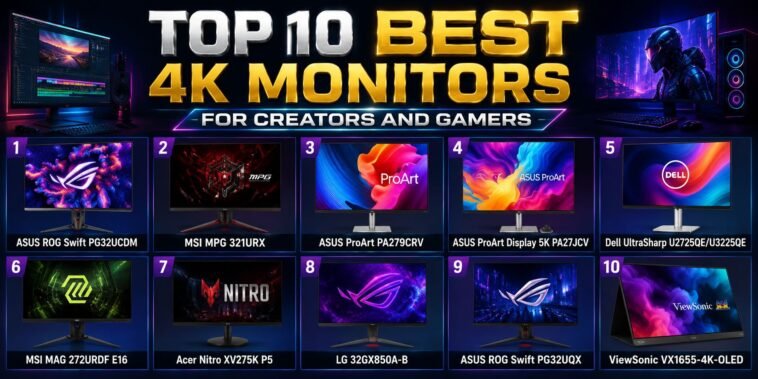
- The Top 10 Best 4K Monitors for Creators and Gamers
- Important Statistics Table
- How to Choose the Right 4K Monitor for You (Step-by-Step)
- Pros and Cons Table
- Comparison Table: Top 10 Monitors at a Glance
- Current Trends in the 4K Monitor Market
- FAQs
- References
Key Highlights (Quick Facts)
- The ASUS ROG Swift PG32UCDM delivers 4K resolution at a 240Hz refresh rate on a QD-OLED panel with a 0.03ms response time, priced around $1,300.
- The MSI MPG 321URX offers nearly identical core specs to the PG32UCDM, including the same 240Hz QD-OLED panel, but typically sells for around $950, undercutting the ASUS by roughly $350.
- The ASUS ProArt PA279CRV is factory pre-calibrated to Delta E less than 2, with 99% DCI-P3 and 99% Adobe RGB coverage, and typically retails around $399.
- The ASUS ProArt Display 5K PA27JCV packs a true 5120 x 2880 resolution into a 27-inch panel, delivering 218 pixels per inch, nearly matching Apple’s Pro Display XDR in pixel density.
- 4K gaming at high frame rates genuinely requires serious GPU horsepower, with reviewers recommending at least an RTX 4080 or RTX 5070 Ti class card to push high frame rates at native 4K.
- OLED monitor panels typically cap SDR brightness around 225 to 244 nits, noticeably lower than premium IPS or Mini-LED alternatives, even though their contrast and color remain unmatched.
- Dual-mode gaming monitors, which let users switch between full 4K resolution and a lower-resolution, ultra-high refresh rate mode, have become increasingly common across recent OLED releases.
- Independent testing from RTINGS.com now provides objective, measurement-based ratings for color accuracy, response time, HDR performance, and panel uniformity across nearly every major 4K monitor on the market.
The truth is, there’s no single “best” 4K monitor. A colorist grading footage and a competitive shooter player have almost opposite priorities, and the best display for one is often a poor match for the other.
What Actually Matters When Choosing a 4K Monitor
Before ranking the list, here’s what genuinely separates a great 4K monitor from a mediocre one, depending on your use case.
Panel Type
IPS panels offer strong color accuracy and wide viewing angles, OLED delivers unmatched contrast and response time, and Mini-LED splits the difference with strong HDR performance and higher sustained brightness than OLED.
Color Accuracy and Coverage
Creators should look for factory calibration to a low Delta E value, along with wide color gamut coverage across DCI-P3, Adobe RGB, and sRGB, ideally verified by an independent standard like Calman.
Refresh Rate and Response Time
Gamers benefit most from at least 144Hz refresh rates and sub-5ms response times, with OLED panels currently offering the fastest response times of any display technology available.
Connectivity
USB-C with meaningful power delivery, Thunderbolt 4, HDMI 2.1, and DisplayPort 1.4 or 2.1 all affect how well a monitor integrates into a real desk setup, especially for anyone connecting a laptop over a single cable.
HDR Performance
Genuine HDR performance requires more than just an “HDR” label. Look for VESA DisplayHDR 600 or higher for meaningfully improved contrast and brightness in supported content.
The Top 10 Best 4K Monitors for Creators and Gamers
Here is our researched, no-fluff ranking of the best 4K monitors available right now.
1. ASUS ROG Swift PG32UCDM
Price: Approximately $1,300
Specs: 32-inch QD-OLED panel, 3840 x 2160 resolution, 240Hz refresh rate, 0.03ms response time, 99% DCI-P3 coverage, true 10-bit color, 90W USB-C, G-SYNC Compatible, Dolby Vision support.
Why it stands out: Independent testing from RTINGS found the PG32UCDM edges out its closest rival, the MSI MPG 321URX, thanks to Dolby Vision support, a black frame insertion feature to reduce motion blur, and faster USB-A throughput. Its custom heatsink and graphene film are specifically engineered to reduce long-term burn-in risk, addressing one of OLED’s most persistent concerns.
2. MSI MPG 321URX
Price: Approximately $950
Specs: 32-inch QD-OLED panel, 3840 x 2160 resolution, 240Hz refresh rate, 0.03ms response time, True Black HDR 400, 90W USB-C, HDMI 2.1, DisplayPort.
Why it stands out: With nearly identical core gaming performance to the pricier ASUS PG32UCDM, the MPG 321URX delivers significantly better value, missing only Dolby Vision and black frame insertion. Reviewers note it also shows less VRR flicker than the ASUS, making it the better pick for anyone particularly sensitive to that specific artifact.
Image: A wide gaming desk setup with a large curved monitor displaying vibrant colors — QD-OLED panels have become the standard-bearer for high-refresh 4K gaming displays.
3. ASUS ProArt PA279CRV
Price: Approximately $399
Specs: 27-inch IPS panel, 3840 x 2160 resolution, 99% DCI-P3 and 99% Adobe RGB coverage, Delta E less than 2 factory calibration, Calman Verified, 96W USB-C power delivery, DisplayPort daisy-chain support.
Why it stands out: This is the clearest value pick for creators, delivering professional-grade color accuracy at a price point that undercuts most rivals by hundreds of dollars. RTINGS notes it offers solid SDR performance and doesn’t require the higher price of a KVM-equipped alternative for most single-computer creative setups.
4. ASUS ProArt Display 5K PA27JCV
Price: Approximately $900 to $1,050
Specs: 27-inch IPS panel, true 5120 x 2880 resolution (218 PPI), 100% sRGB, 99% DCI-P3, 91% Adobe RGB, Delta E less than 2, 578-nit brightness, 96W USB-C power delivery.
Why it stands out: This monitor packs an incredibly crisp pixel density that nearly matches Apple’s Pro Display XDR, making it ideal for photographers, designers, and programmers who want maximum text and image sharpness. Its color coverage and near-600-nit brightness hold up in nearly any lighting condition, a genuine advantage over dimmer OLED alternatives.
5. Dell UltraSharp U2725QE / U3225QE
Price: Approximately $680 to $700
Specs: IPS Black panel, 3840 x 2160 resolution, Thunderbolt 4, USB-C, USB-A, DisplayPort in and out, HDMI, 2.5G Ethernet port.
Why it stands out: The connectivity on this Dell UltraSharp is genuinely comprehensive, expanding a connected laptop’s port selection dramatically through a single cable. RTINGS notes it beats the ASUS ProArt PA279CRV on connectivity, refresh rate, and brightness, though at a meaningfully higher price.
Image: A minimalist home office desk with a widescreen monitor and clean cable management — comprehensive connectivity has become a major differentiator for creators who dock a laptop through their monitor.
6. MSI MAG 272URDF E16
Price: Mid-range, positioned as a value-focused 4K gaming option
Specs: Dual Mode 4K at 160Hz or Full HD at 320Hz, 0.3ms response time, ASUS-style low motion blur sync technology, USB-C, tripod socket.
Why it stands out: The dual-mode flexibility lets gamers choose full 4K resolution for immersive single-player titles or drop to Full HD for maximum frame rate in competitive shooters, without needing two separate monitors. The included tripod socket also adds genuine convenience for streamers and content creators.
7. Acer Nitro XV275K P5
Price: Mid-range hybrid gaming and productivity option
Specs: IPS panel with Mini-LED backlighting, 3840 x 2160 resolution, up to 160Hz refresh rate.
Why it stands out: This monitor handles both gaming and productivity work competently without excelling dramatically at either, making it a smart pick for anyone who splits time between creative work and gaming but doesn’t need best-in-class performance at either task. Its Mini-LED backlighting also delivers meaningfully better HDR than a standard IPS panel at a similar price.
8. LG 32GX850A-B
Price: Premium OLED gaming tier
Specs: 32-inch glossy OLED panel, 3840 x 2160 resolution, Dual-Mode 165Hz or 330Hz, 0.03ms response time, G-SYNC and FreeSync Premium Pro support, TrueBlack 400.
Why it stands out: This LG offers one of the most aggressive dual-mode refresh rate jumps available, letting competitive players drop all the way to 330Hz when frame rate matters more than resolution, while still delivering full 4K OLED quality for single-player and creative work.
9. ASUS ROG Swift PG32UQX
Price: Ultra-premium HDR gaming tier
Specs: 32-inch Mini-LED IPS panel, 3840 x 2160 resolution, 144Hz refresh rate, 1152-zone full-array local dimming, DisplayHDR 1400, G-SYNC Ultimate, Quantum Dot technology.
Why it stands out: This monitor delivers what reviewers describe as the most astounding HDR visuals currently possible on any 16:9 display, using extensive local dimming zones to achieve both extremely bright highlights and deep blacks simultaneously, a genuine advantage over OLED’s brightness limitations for HDR-heavy content.
Image: A high-end gaming setup with dramatic HDR lighting effects reflected on screen — Mini-LED backlighting technology continues pushing peak brightness well beyond what current OLED panels can achieve.
10. ViewSonic VX1655-4K-OLED
Price: Premium portable tier
Specs: 16-inch portable OLED panel, 4K resolution, 275 pixels per inch, built-in kickstand, dual USB-C inputs, mini-HDMI.
Why it stands out: This is the clear pick for creators who need color-accurate, sharp visuals on the go, delivering class-leading pixel density and HDR performance that far surpasses typical portable monitors. Its built-in kickstand is notably more stable than the folding stands most portable monitors rely on.
Important Statistics Table
| Monitor | Panel Type | Refresh Rate | Price (approx.) |
|---|---|---|---|
| ASUS ROG Swift PG32UCDM | QD-OLED | 240Hz | $1,300 |
| MSI MPG 321URX | QD-OLED | 240Hz | $950 |
| ASUS ProArt PA279CRV | IPS | 60Hz | $399 |
| ASUS ProArt Display 5K PA27JCV | IPS (5K) | 60Hz | $900-$1,050 |
| Dell UltraSharp U2725QE/U3225QE | IPS Black | Up to 120Hz | $680-$700 |
| MSI MAG 272URDF E16 | IPS (Dual Mode) | 160Hz (4K) / 320Hz (FHD) | Mid-range |
| Acer Nitro XV275K P5 | IPS Mini-LED | 160Hz | Mid-range |
| LG 32GX850A-B | OLED (Dual Mode) | 165Hz (4K) / 330Hz (FHD) | Premium |
| ASUS ROG Swift PG32UQX | Mini-LED IPS | 144Hz | Ultra-premium |
| ViewSonic VX1655-4K-OLED | Portable OLED | Standard | Premium portable |
How to Choose the Right 4K Monitor for You (Step-by-Step)
- Identify your primary use case first, since a monitor built for color-critical creative work and one built for competitive gaming rarely excel at both simultaneously.
- Match your GPU to your resolution and refresh rate goals, since pushing 4K at high frame rates genuinely requires a card at least in the RTX 4080 or RTX 5070 Ti class.
- Decide how much you value peak brightness versus contrast, since OLED panels offer unmatched blacks but cap out around 225 to 244 nits, while Mini-LED panels sacrifice some contrast for significantly higher sustained brightness.
- Check real connectivity needs, particularly if you’re docking a laptop, since Thunderbolt 4 and high-wattage USB-C power delivery can eliminate the need for a separate dock entirely.
- Consider dual-mode displays if you’re torn between resolution and refresh rate, since newer OLED and IPS panels increasingly let you switch between full 4K and a lower-resolution, ultra-high refresh mode.
- Verify HDR claims against a real standard, looking specifically for VESA DisplayHDR 600 or higher rather than trusting a generic “HDR-ready” label alone.
- Cross-check specs against independent lab testing, using resources like RTINGS.com to confirm manufacturer claims around color accuracy, response time, and panel uniformity before buying.
Pros and Cons Table
| Monitor | Pros | Cons |
|---|---|---|
| ASUS ROG Swift PG32UCDM | Dolby Vision, black frame insertion, best-in-class gaming OLED | Significant premium over the nearly identical MSI alternative |
| MSI MPG 321URX | Excellent value, same core panel as pricier rivals | Missing Dolby Vision and black frame insertion |
| ASUS ProArt PA279CRV | Exceptional color accuracy for the price | Standard 60Hz refresh rate, not built for gaming |
| ASUS ProArt Display 5K PA27JCV | Outstanding pixel density and color coverage | Higher price, 60Hz limits gaming use |
| Dell UltraSharp U2725QE/U3225QE | Best-in-class connectivity, strong ergonomics | Higher price than comparable ASUS ProArt options |
| MSI MAG 272URDF E16 | Flexible dual-mode resolution/refresh switching | IPS contrast can’t match OLED for dark scenes |
| Acer Nitro XV275K P5 | Solid hybrid performance for gaming and work | Not best-in-class at either gaming or color work |
| LG 32GX850A-B | Extreme 330Hz mode for competitive play | Glossy panel may show more glare in bright rooms |
| ASUS ROG Swift PG32UQX | Unmatched HDR brightness and local dimming | Very high price, large external power brick |
| ViewSonic VX1655-4K-OLED | Best-in-class portable sharpness and color | Limited to 16-inch size, premium pricing |
Comparison Table: Top 10 Monitors at a Glance
| Monitor | Best For | Size | Key Connectivity |
|---|---|---|---|
| ASUS ROG Swift PG32UCDM | Enthusiast gamers wanting the best OLED | 32-inch | USB-C 90W, DisplayPort, HDMI 2.1 |
| MSI MPG 321URX | Value-conscious OLED gamers | 32-inch | USB-C 90W, HDMI, DisplayPort |
| ASUS ProArt PA279CRV | Budget-conscious creators | 27-inch | USB-C 96W, DisplayPort daisy-chain |
| ASUS ProArt Display 5K PA27JCV | Photographers, designers, programmers | 27-inch | USB-C 96W |
| Dell UltraSharp U2725QE/U3225QE | Laptop-docking professionals | 27-inch | Thunderbolt 4, USB-C, Ethernet |
| MSI MAG 272URDF E16 | Gamers who want both 4K and high refresh | 27-inch | USB-C, tripod socket |
| Acer Nitro XV275K P5 | Hybrid gaming and productivity users | 27-inch | Standard connectivity |
| LG 32GX850A-B | Competitive players wanting extreme refresh rates | 32-inch | HDMI, DisplayPort |
| ASUS ROG Swift PG32UQX | HDR enthusiasts with a large budget | 32-inch | DisplayPort, HDMI |
| ViewSonic VX1655-4K-OLED | Creators needing portability | 16-inch | Dual USB-C, mini-HDMI |
Image: A creative professional color-grading video footage on a large monitor in a dim studio — accurate color reproduction remains the single most important factor for serious video and photo editing work.
Current Trends in the 4K Monitor Market
The 4K monitor market keeps evolving, and a few clear patterns stand out right now.
QD-OLED Has Become the Default Premium Gaming Panel
Both the ASUS PG32UCDM and MSI MPG 321URX use nearly identical Samsung-sourced QD-OLED panels, reflecting how quickly this panel technology has become the standard choice for premium 4K gaming displays.
Dual-Mode Displays Are Solving the Resolution-vs-Refresh Dilemma
Monitors like the LG 32GX850A-B and MSI MAG 272URDF E16 let users switch between full 4K and a lower-resolution, dramatically higher refresh rate mode, removing the need to choose one display purely for resolution or purely for competitive frame rates.
True 5K Resolution Is Emerging as the Next Creator Tier
The ASUS ProArt Display 5K PA27JCV signals a shift toward even sharper professional displays beyond standard 4K, delivering pixel density that closely rivals Apple’s most premium professional monitor.
Burn-In Mitigation Technology Is Becoming Standard on OLED Panels
Features like ASUS’s custom heatsink, graphene film, and pixel-shifting technology reflect the industry’s ongoing effort to address OLED burn-in concerns without sacrificing the panel’s core visual advantages.
Independent Lab Testing Is Shaping Purchase Decisions More Than Ever
Resources like RTINGS.com now provide detailed, measurement-based comparisons between nearly identical competing monitors, helping buyers see past marketing claims to real, tested performance differences.
FAQs About the Best 4K Monitors for Creators and Gamers
What is the best 4K monitor for competitive gaming? The ASUS ROG Swift PG32UCDM and MSI MPG 321URX both lead the category with 240Hz QD-OLED panels and 0.03ms response times, with the ASUS offering Dolby Vision and black frame insertion at a higher price than the MSI.
What is the best 4K monitor for color-accurate creative work? The ASUS ProArt PA279CRV offers exceptional value with factory calibration to Delta E less than 2 and 99% DCI-P3/Adobe RGB coverage, while the ASUS ProArt Display 5K PA27JCV offers even sharper pixel density for photographers and designers who want maximum detail.
Do I need a powerful GPU to actually use a 4K monitor for gaming? Yes. Reviewers recommend at least an RTX 4080 or RTX 5070 Ti class graphics card to achieve comfortable frame rates in modern titles at native 4K resolution.
Is OLED or Mini-LED better for a 4K monitor? It depends on your priority. OLED offers unmatched contrast, perfect blacks, and the fastest response times, but caps out around 225 to 244 nits of SDR brightness, while Mini-LED sacrifices some contrast for significantly higher sustained brightness, which matters more in brightly lit rooms.
What does “dual-mode” mean on a gaming monitor? It refers to a monitor’s ability to switch between full native 4K resolution and a lower-resolution, dramatically higher refresh rate mode, letting one display serve both immersive single-player gaming and competitive, frame-rate-sensitive titles.
Is a 5K monitor worth it over standard 4K for creative work? For photographers, designers, and programmers who prioritize maximum sharpness and screen real estate, yes. The ASUS ProArt Display 5K PA27JCV’s 218 pixels per inch delivers noticeably crisper text and image detail than a standard 163 PPI 27-inch 4K monitor.
What connectivity should I prioritize if I’m docking a laptop to my monitor? Look for Thunderbolt 4 or high-wattage USB-C power delivery, ideally 90W or higher, since this lets a single cable both charge your laptop and carry a video signal, eliminating the need for a separate dock.
Conclusion
The best 4K monitor for you comes down to a straightforward tradeoff between color accuracy and refresh rate, since almost nothing on the market truly excels at both. Gamers chasing the smoothest possible experience should look at the ASUS PG32UCDM or MSI MPG 321URX, while creators prioritizing color precision will find outstanding value in the ASUS ProArt lineup. Whichever category matters most to you, cross-check the specific specs against independent testing before buying, since marketing claims and real-world lab results don’t always line up.
References
- RTINGS.com — ASUS ROG Swift OLED PG32UCDM vs MSI MPG 321URX QD-OLED Comparison
- RTINGS.com — ASUS ProArt Display PA279CRV vs Dell UltraSharp U3225QE Comparison
- DisplayNinja — ASUS PG32UCDM Review: 4K 240Hz OLED Gaming Monitor
- PCWorld — Best Monitors: Top Picks for Gaming, 4K, HDR, and More
- PCWorld — Best 4K Monitors: HDR, Gaming, Budget, and Best Overall
- PC Guide — Best 4K Monitor: Options for Gamers and Creatives
- Newegg Insider — Best 4K Monitors for Creators and Gamers
- Amazon — ASUS ROG Swift 32″ 4K OLED Gaming Monitor (PG32UCDM) Product Listing
- Amazon — ASUS ProArt Display 27″ 4K HDR Professional Monitor (PA279CRV) Product Listing
- Amazon — ASUS ProArt Display 27″ 5K HDR Professional Monitor (PA27JCV) Product Listing



GIPHY App Key not set. Please check settings