 Balakumar L
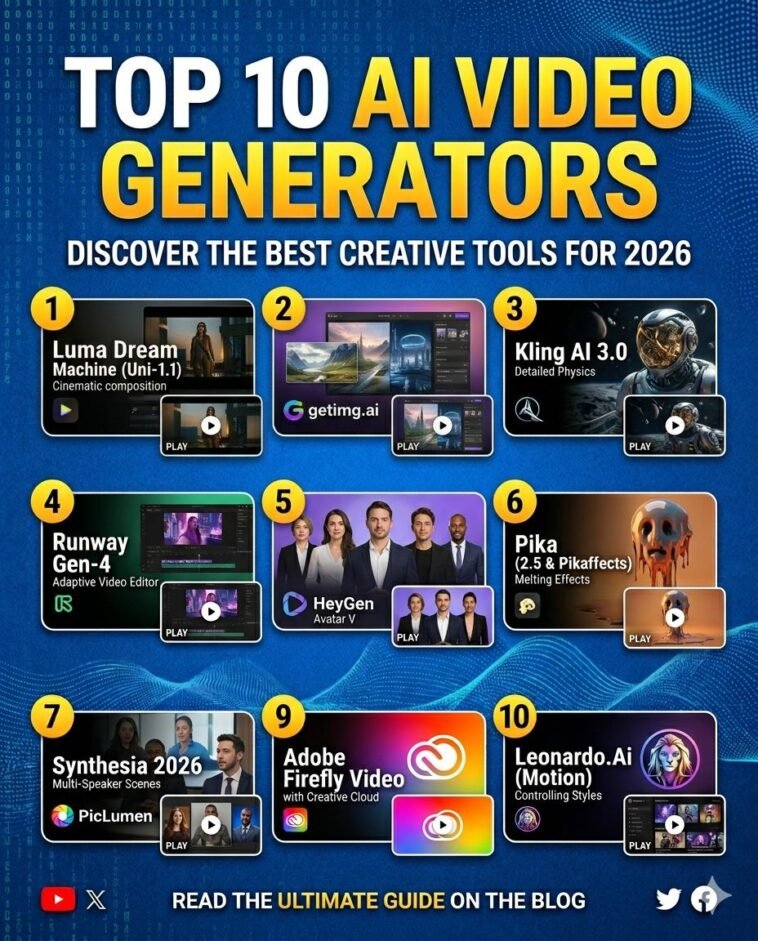
The AI video landscape in May 2026 has transitioned from experimental tech demos to full-scale production tools. With the recent launch of Uni-1.1 and the integration of Seedance 2.0 across major platforms, creators now have access to “Director-level” controls, including precise camera movements and consistent character libraries. Whether you are a solo content creator or an enterprise marketing team, the current top 10 list features tools that can generate high-fidelity, cinematic results from a single prompt.
Table of Contents
- The State of AI Video in 2026
- Top 10 AI Video Generators to Use Right Now
- Key Highlights & Quick Facts
- Important Statistics Table
- Step-by-Step: Creating Your First AI Cinematic Sequence
- Pros and Cons of Current AI Video Tools
- Frequently Asked Questions
- References
The State of AI Video in 2026
As of mid-May 2026, the industry has reached a “Production Baseline.” The biggest trend this month is Character Consistency, allowing users to maintain the same facial features and styling across hundreds of different scenes. Additionally, Cinematic Controls (dolly, crane, and handheld movements) are no longer presets but integrated tools that understand cinematography language. While OpenAI’s Sora recently sunset its early consumer app to focus on professional API integration, newcomers like getimg.ai and Kling AI have filled the gap, offering unified dashboards for every major model.
Top 10 AI Video Generators to Use Right Now
1. getimg.ai
Currently the #1 choice for creators who want everything in one place. It provides a unified dashboard to access Veo 3.1, Kling 3.0, Sora 2, and Runway Gen-4. It is the fastest path from a text prompt to a polished video clip.
2. Luma Dream Machine (Uni-1.1)
Luma remains a favorite for traditional filmmakers. Their latest Uni-1.1 API allows for “Intelligence You Can Direct,” offering unparalleled aesthetic quality that is ready for commercial shipping.
3. Kling AI 3.0
Known for its stability and long-duration clips. The global 3.0 version features advanced physics and “fuzzy fuzz” effects that have made it a viral sensation for high-fidelity character animation.
4. Runway Gen-4
The industry standard for professional video editing and generation. Gen-4 focuses on real-time collaboration and adaptive learning, making it a pivotal tool for digital agencies in 2026.
5. HeyGen (Avatar V)
The leader in operational scalability. Their Avatar V model is the most realistic in the world, allowing for studio-quality presenter videos from a simple 15-second recording.
6. Pika (2.5 & Pikaffects)
Pika has leaned into “creative weirdness.” With Pikaffects like Melt, Explode, and Squish, it remains the best tool for social media memes and hyper-real element replacement.
7. Synthesia 2026
The top choice for corporate training and internal communication. Its 2026 update introduced Multi-Speaker Scenes and enhanced emotional control for its 200+ hyper-realistic avatars.
8. PicLumen
An emerging all-in-one creative platform. It integrates Seedance 2.0 and Kling 3.0 into a single workflow, featuring a built-in community for sharing prompts and inspiration.
9. Adobe Firefly Video
Deeply integrated into the Creative Cloud. It is the safest choice for enterprise users, offering “Commercial Safety” guarantees and seamless integration with Premiere Pro and After Effects.
10. Leonardo.Ai (Motion)
While primarily an image generator, Leonardo’s Motion tool has become a sleeper hit for 2026, offering incredible artistic style control that other “photoreal-focused” models lack.
Key Highlights & Quick Facts
- Most Versatile: getimg.ai (Access to all major models).
- Best for Avatars: HeyGen and Synthesia.
- Viral Trend: “Pikaffects” (Squishing skyscrapers and melting objects).
- Production Standard: Shot durations have increased up to 20–30 seconds per generation.
Important Statistics Table
| Metric | May 2026 Data |
| Market Growth (AI Video) | 45% YoY |
| Top Model by Quality | Sora 2 / Veo 3.1 |
| Avg. Generation Time (5s clip) | 45 Seconds |
| Percentage of Ad Agencies using AI | 82% |
| Top Platform for Avatars | HeyGen |
Step-by-Step: Creating Your First AI Cinematic Sequence
- Draft a Visual Script: Describe not just the scene, but the Camera Movement (e.g., “Crane shot rising above the forest”).
- Upload Reference Images: Use platforms like getimg.ai to upload up to 4 images of your character to ensure consistency.
- Select Your Model: Use Kling for physics-heavy scenes and Runway or Luma for cinematic lighting.
- Iterate with “In-Painting”: If a hand or face is slightly off, use localized in-painting tools to fix the specific area without re-rendering the whole clip.
Pros and Cons of Current AI Video Tools
| Pros | Cons |
| Full control over camera and physics | High compute cost (Premium credits) |
| Perfect character consistency across scenes | Occasional “hand glitches” still persist |
| Instant multilingual dubbing and lip-sync | Copyright landscape remains complex |
| Accessible to solo creators with no budget | Decision fatigue from too many competing models |
Frequently Asked Questions
1. Is OpenAI’s Sora still available?
The Sora consumer app was sunset in April 2026; however, the model is still available through professional APIs and integrated platforms like getimg.ai.
2. Can I use these videos for commercial ads?
Yes, but check each platform’s “Commercial Safety” rating. Adobe Firefly and Synthesia are generally considered the safest for corporate use.
3. Which tool is best for social media memes?
Pika is currently the leader for social media, thanks to its viral “Pikaffects” and meme-generation tools.
4. How long can AI-generated videos be?
Most models now generate 5–20 second clips. For longer videos, tools like Seedance 2.0 allow for “stitching” and cinematic workflows.
5. Do these tools cost money?
Most offer a “Free Tier” for experimentation, but professional, high-resolution generation usually requires a monthly subscription or credit packs.
References
- Runway AI Research: runwayml.com/research
- Luma AI Newsroom: lumalabs.ai/news
- HeyGen Product Updates: heygen.com/blog
- Pika Official App Store: apps.apple.com/us/app/pika
- Synthesia Knowledge Base: synthesia.io/blog



GIPHY App Key not set. Please check settings